Updated: October 26, 2026
The video you need every week is not the video you hire for
A Miami nonprofit with an active communications programme publishes video constantly: a thirty-second clip from the food distribution on Saturday, a volunteer thanking donors, a board chair's message before the gala, a quick explainer of a new programme, a reel from the walk. None of these justify a production company. All of them need to be competent, on brand and out within a day. The organisations that manage it have built a small in-house capability: a staff member or two who can shoot and cut simple video on a phone, a kit that lives in a drawer, a few templates, and a clear line about when to call a professional.
This guide is about building that capability: what to buy, who to train, what the in-house team should and should not attempt, how to keep it looking like one organisation made it, and how it fits alongside the professionally produced films that carry the big campaigns. It is written for a communications lead at a small or mid-sized organisation, and it assumes almost no budget.
What in-house video is for
The in-house team covers the fast, frequent and low-stakes: social clips, event moments, quick updates, behind-the-scenes, thank-yous, internal communications. It does not cover the films that carry money or reputation: the year-end appeal, the capital campaign case, the impact story that goes to a foundation, the annual report film. Those are shot once, used for a year, and judged by people who write cheques; our guide to producing nonprofit video on a tight budget explains how to buy those well. The trap is trying to do the appeal on a phone because the phone is there. The second trap is hiring a crew for a volunteer thank-you.
The kit
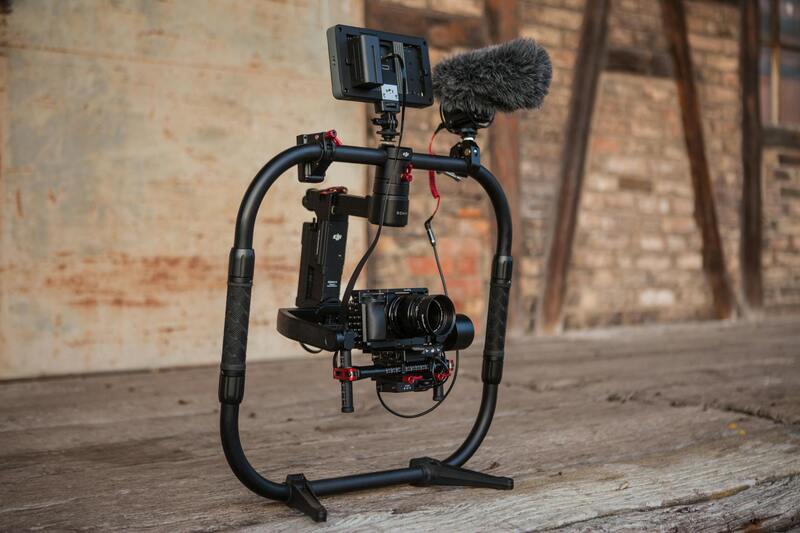
A phone from the last three years shoots better video than the cameras nonprofits owned a decade ago. What it lacks is sound, stability and light, and those are cheap to add:
- A clip-on wireless microphone that pairs with the phone. This is the single purchase that separates usable video from unusable; phone audio from two metres away in a gym is not usable.
- A small tripod with a phone clamp for interviews and messages, and a compact handheld gimbal if the team films a lot of walking-around footage.
- A small LED light on a stand, for interviews indoors.
- Extra storage and a habit of clearing it. A phone that is full at the event is the most common failure.
- Editing on the phone or a laptop with one of the mainstream apps; the free tiers are enough for social clips.
The whole kit costs less than a single day of professional crew. Keep it in one bag, charged, with a checklist card inside.
Who does it
One person owns it, and one more is trained as backup. The owner is usually the communications or marketing staff member, but the best in-house shooters are often programme staff who are already where the stories happen and are trusted by the people in them. Training is a half day on the basics (hold it steady, get close, get the mic on, shoot in landscape or vertical depending on where it goes, get a wide, a medium and a close of everything, film ten seconds longer than feels natural) and a half day on the editing app. A professional videographer can deliver that training in a morning; it is a common request and a good use of a small budget.
Keeping it on brand
The risk of in-house video is not that it looks amateur; audiences accept phone footage from a nonprofit. The risk is that it looks like six different organisations. Fix that with a small set of rules and templates:
- A title card, a lower-third and an end card as templates in the editing app, with the logo, the fonts and the colours locked.
- Two or three approved music tracks, licensed for social use, so nobody grabs a song that gets the post muted.
- A one-page style note: how the organisation's name appears, which programmes are called what, the caption style, what the call to action is this quarter.
- A consent rule that every staff member knows: who can be filmed, what release is used, and what to do when someone says no. The details are in our guide to consent and dignity when filming the people you serve, and they apply to a phone exactly as they apply to a crew.
A weekly rhythm
In-house video works when it is a habit, not a project. A pattern that fits a small team:
- One planned clip per week, decided on Monday: a programme moment, a person, an update.
- Footage gathered by whoever is there, using the checklist, uploaded to a shared folder the same day.
- Cut and posted within 48 hours by the owner, using the templates.
- Everything filed in a simple library by date and programme, so the professional team can use it later as B-roll and the year-end film can draw on a year of real moments. What to track and report is in our piece on measuring nonprofit video.
When to call a professional
- The film will be used for more than a month or shown to major donors, foundations or the board.
- It needs interviews with vulnerable people, where lighting, sound and the interviewer's skill decide whether the person is served or exposed.
- It needs a story built from many pieces, not a moment captured.
- It will be in a gala room on a big screen, where phone footage shows every flaw; see our guide to charity event video.
- Nobody in-house has the time this month, which is a legitimate reason.
The professional and the in-house team are not rivals. The best arrangement is a videographer who produces the two or three films a year that matter, trains the staff, sets up the templates, and is available for a quick question when the phone footage is doing something strange.
Building your capability with Miami Video Services
We help Miami nonprofits set up in-house video: a half-day training for staff, a kit list matched to the budget, branded templates for the editing app the team already uses, licensed music, a consent protocol, and a shared library structure that makes staff footage useful to the professional films later. We then produce the campaign films that need a crew, using the year of real moments the team has gathered. If your organisation posts video every week and wants it to look like one organisation made it, talk to us about a setup session. More about our nonprofit work is on the about page, and our other guides are on the blog.